AI 摘要本文详细介绍了如何利用腾讯云EdgeOne Pages,通过“复制粘贴、打包压缩、拖拽上传”三步,零代码快速搭建一个高颜值的二次元导航站。用户无需服务器和编程知识,即可拥有自带毛玻璃特效、随机二次元背景、聚合搜索、全端适配的网站。部署过程包括准备`index.html`和`404.html`文件、将其压缩为`.zip`包,然后手动上传至EdgeOne控制台。文章强调了EdgeOne提供的全球加速和可视化操作优势,并指导用户绑定自定义域名及后续更新方法,让建站变得简单高效。
想拥有一个属于自己的高颜值导航站,但一看到代码就头疼,觉得非常麻烦?
没关系!今天我们换一种更简单、更直接的方式。
只需要 “复制粘贴 -> 打包压缩 -> 拖拽上传” 三步,利用 腾讯云 EdgeOne Pages 的手动部署功能,就能把这个自带毛玻璃特效、随机二次元背景的 YumeACG 导航站 发布上线!
无需服务器 |无需敲代码 |全程可视化操作
还是先看导航站效果
- 极速访问:依托腾讯云边缘节点,全球秒开。
- 全端适配:手机、电脑完美自适应。
- 颜值正义:自带聚合搜索、毛玻璃 UI、专属 404 页面。
电脑端展示: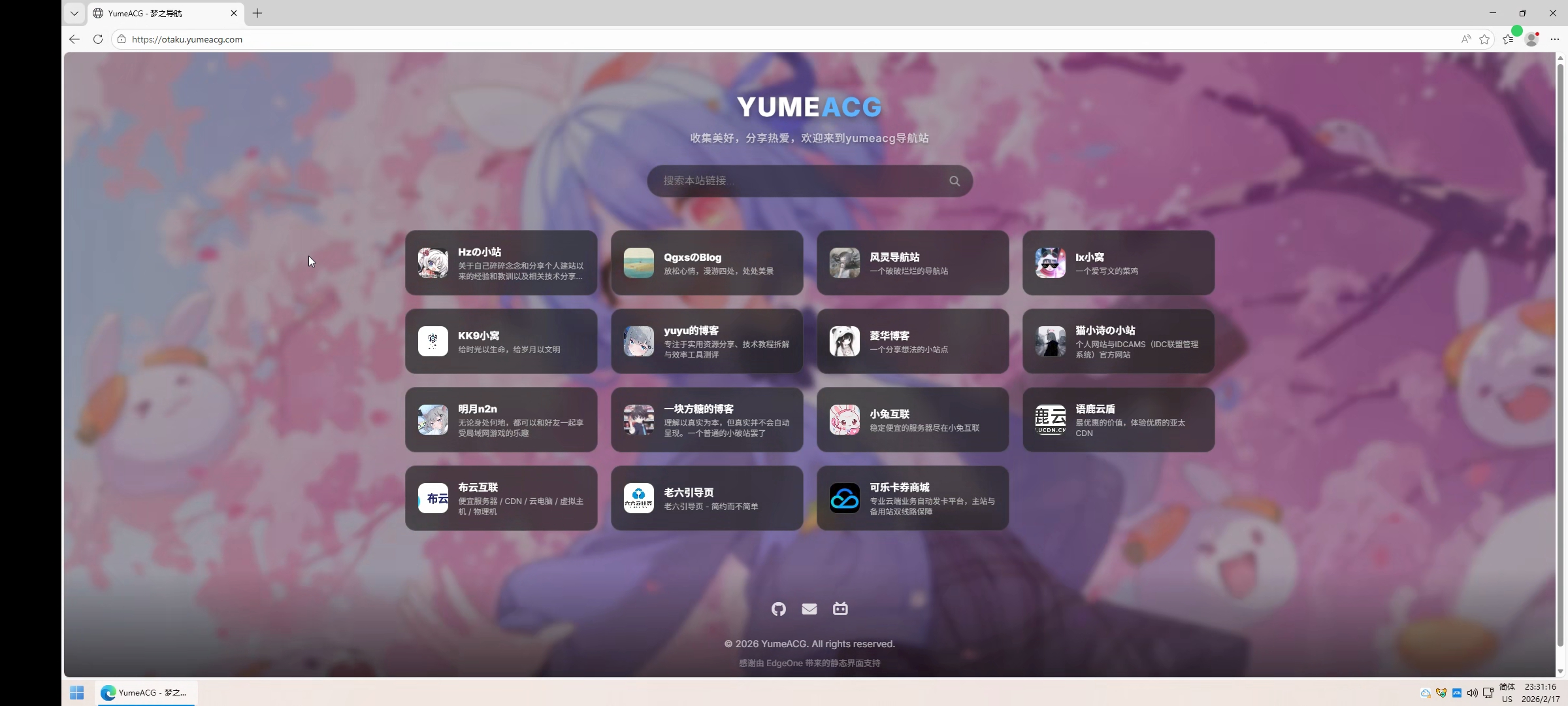
手机端展示: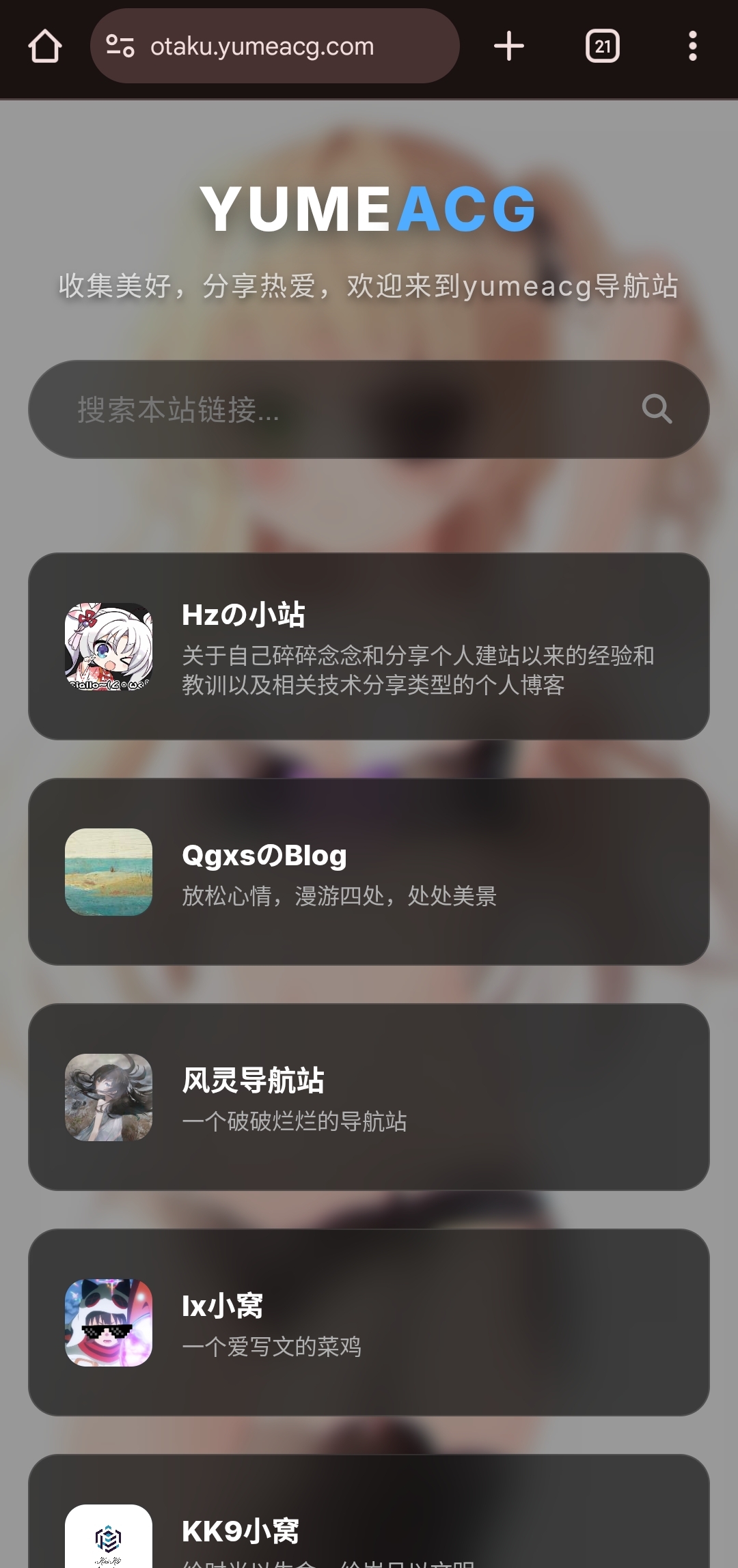
准备工作
- 腾讯云账号 1 个(开通 EdgeOne 即可,有免费额度)。
- 电脑 1 台(系统自带记事本就能做)。
- 双手 1 双(有手就行)。
部署教程:保姆级四步走
第一步:本地准备代码文件
我们在电脑桌面上新建一个文件夹,命名为 MyNav(或者你喜欢的名字),然后进入文件夹。
1. 创建主页 (index.html)
- 新建一个文本文档,重命名为
index.html。 - 用记事本(或 VS Code)打开它。
- 将本文 【附录:源码复制区】 里的
index.html代码全部复制进去,保存。
2. 创建 404 页 (404.html) - 新建一个文本文档,重命名为
404.html。 - 同样用记事本打开。
- 将本文 【附录:源码复制区】 里的
404.html代码复制进去,保存。
修改提示:
此时,你可以直接在记事本里搜索“Hzの小站”改成你的名字,把href="..."里的链接换成你常用的地址。改完保存,这就是你的专属版本了!
第二步:打包压缩
现在你的文件夹里应该有两个文件:index.html 和 404.html。
- 同时选中这两个文件( 注意:是选中这俩文件,不是选中外面的文件夹)。
- 鼠标右键 -> 发送到 -> 压缩(zipped)文件夹(或者使用 WinRAR/7-Zip 压缩为
.zip格式)。 - 你会得到一个
index.zip或者archive.zip,这就是我们要上传的“网站包”。
第三步:EdgeOne 拖拽上线
- 登录 腾讯云 EdgeOne 控制台。
- 左侧菜单点击 Pages (页面托管)。
- 点击 新建项目。
- 关键一步:选择 【手动上传】。
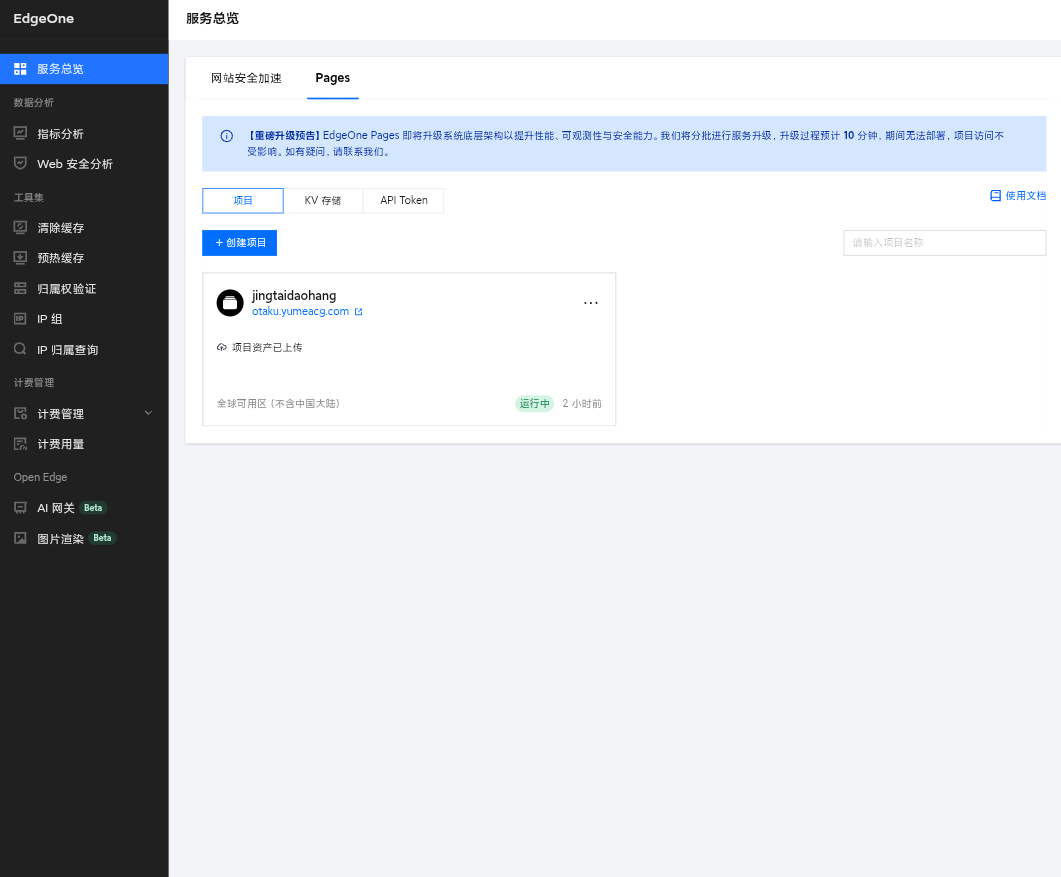
- 上传文件:点击上传区域,选择你刚才压缩好的
.zip包,或者直接把它拖进去。 - 项目名称:给你的网站起个名,比如
mynav-2026。 - 点击 部署。
等待几秒钟,当你看到 “部署成功” 的绿色提示时,恭喜你!你的网站已经发布到了互联网上!
重要提示:
EdgeOne 自动分配的预览域名仅有 3小时有效期。
请务必前往项目设置,绑定你自己的自定义域名!
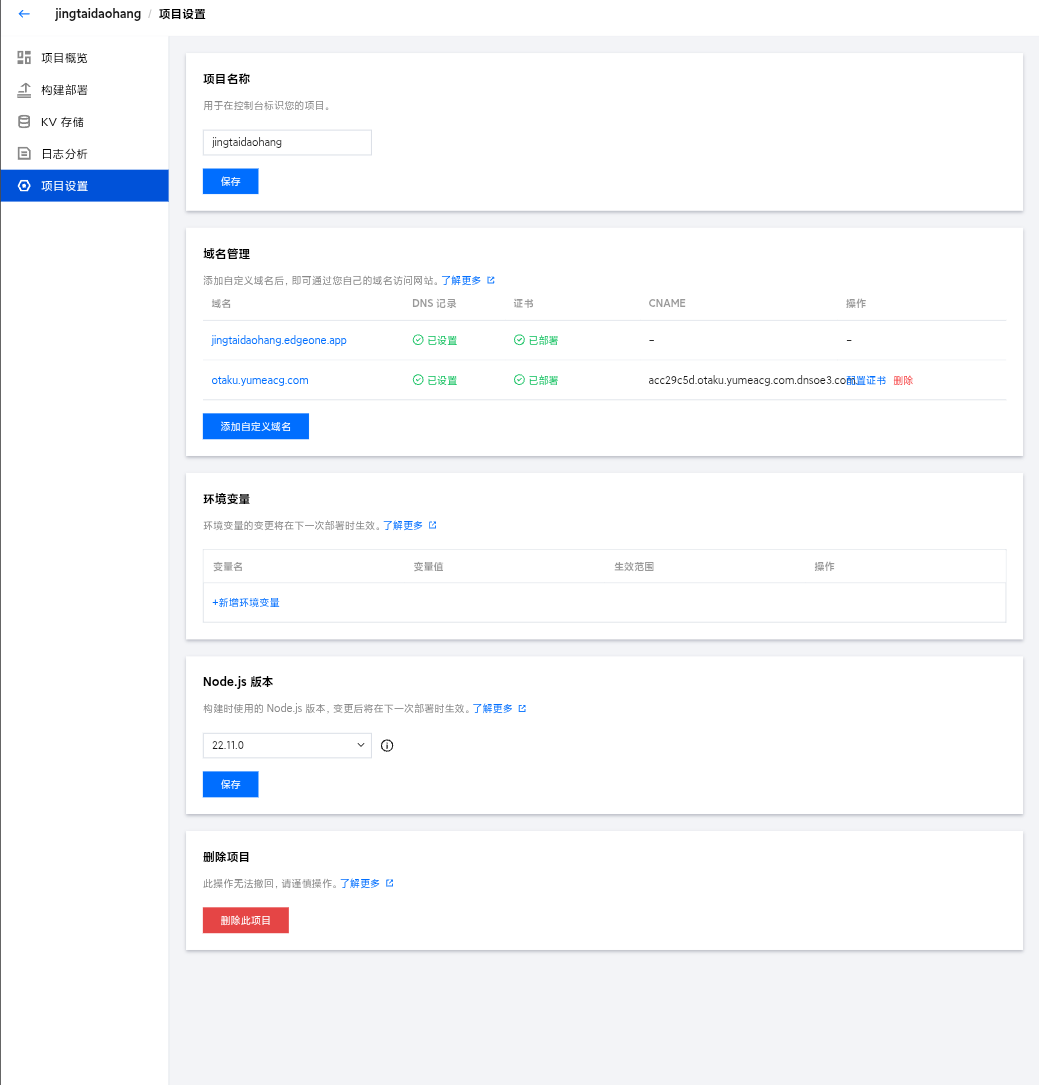
第四步:后续如何更新?
如果你以后想添加新的链接,或者换个背景图,操作也非常简单:
- 在本地电脑修改好
index.html。 - 重新选中文件压缩成
.zip包。 - 回到 EdgeOne 控制台,点击你的项目 -> 概览 -> 新建部署。
- 上传新的压缩包即可。
EdgeOne 会自动更新你的网站,完全不用懂复杂的服务器运维知识!
简单修改指南 (记事本也能改)
既然代码都在本地,修改起来非常方便。打开 index.html,使用 Ctrl+F 搜索对应的关键词即可修改:
- 改标题:搜索
<title>,把里面的文字改成你的。 - 改 Logo:搜索
class="logo",修改YUME<span>ACG</span>里的文字。 加链接:
搜索<!-- 1. [置顶],你会看到类似这样的代码块:<a href="目标链接" target="_blank" class="card"> <img src="图片地址" ...> <div class="card-content"> <div class="card-title">网站名称</div> <div class="card-desc">简介</div> </div> </a>复制这一整块,粘贴在后面,填入你的新链接即可。
总结
看,做网站其实没那么难!
通过 腾讯云 EdgeOne 手动上传 功能,用最朴素的“打包上传”方式,就拥有了一个全球加速的静态导航站。
不用买服务器,不用担心被攻击,只要你有文件,EdgeOne 就能帮你分发到全世界。快去试试吧!
附录:源码复制区
1. 主页代码 (index.html)
此处代码为本站同款,直接复制修改所需到地方即可(不懂可使用AI进行辅助替换):
<!DOCTYPE html>
<html lang="zh-CN">
<head>
<meta charset="UTF-8">
<meta name="viewport" content="width=device-width, initial-scale=1.0">
<!-- [可修改] 网页标题 -->
<title>您的网站标题 - 个人导航站</title>
<!-- [可修改] SEO关键词和描述 -->
<meta name="keywords" content="导航站,个人主页,资源分享,二次元">
<meta name="description" content="这是一个基于 HTML5 的个人导航站模板">
<!-- [可修改] 网页图标 (Favicon) -->
<!-- 请替换 href 中的链接为您自己的图标 -->
<link rel="icon" href="https://ui-avatars.com/api/?name=Site&background=0D8ABC&color=fff" type="image/webp">
<link rel="apple-touch-icon" href="https://ui-avatars.com/api/?name=Site&background=0D8ABC&color=fff">
<!-- 引入谷歌字体-->
<link href="https://fonts.googleapis.com/css2?family=Inter:wght@400;600;800&family=Noto+Sans+SC:wght@400;700&display=swap" rel="stylesheet">
<!-- 引入图标库 -->
<link rel="stylesheet" href="https://cdnjs.cloudflare.com/ajax/libs/font-awesome/6.4.0/css/all.min.css">
<style>
/* --- 核心配置区 (可在此处修改全局样式) --- */
:root {
/* [可修改] 背景图片设置 */
/* 目前使用的是 LoliAPI (动漫API),如果想换成自己的图片,请替换 url('...') 中的链接 */
--bg-image: url('https://www.loliapi.com/acg/');
/* 配色方案 */
--glass-bg: rgba(20, 20, 20, 0.70); /* 卡片背景透明度 */
--glass-border: rgba(255, 255, 255, 0.1); /* 边框颜色 */
--text-color: #ffffff; /* 主文字颜色 */
--text-desc: #b0b0b0; /* 描述文字颜色 */
--accent-color: #4facfe; /* 强调色 (鼠标悬停/高亮) */
--hover-bg: rgba(255, 255, 255, 0.15); /* 鼠标悬停背景 */
}
* { margin: 0; padding: 0; box-sizing: border-box; }
body {
font-family: 'Inter', 'Noto Sans SC', sans-serif;
color: var(--text-color);
min-height: 100vh;
display: flex;
flex-direction: column;
align-items: center;
background-color: #111;
}
/* 背景层 */
.bg-layer {
position: fixed;
top: 0; left: 0; width: 100%; height: 100%;
z-index: -2;
background-image: var(--bg-image);
background-size: cover;
background-position: center;
background-attachment: fixed;
}
/* 背景遮罩 (让文字更清晰) */
.bg-overlay {
position: fixed;
top: 0; left: 0; width: 100%; height: 100%;
z-index: -1;
background: rgba(0, 0, 0, 0.4);
backdrop-filter: blur(5px);
}
/* 布局容器 */
.container {
width: 100%;
max-width: 1280px;
padding: 60px 20px;
animation: fadeIn 0.8s ease;
}
/* 头部样式 */
header {
text-align: center;
margin-bottom: 50px;
display: flex;
flex-direction: column;
align-items: center;
}
/* Logo 图片样式 */
.site-logo-link {
display: block;
width: 100px;
height: 100px;
margin-bottom: 15px;
border-radius: 50%;
overflow: hidden;
border: 3px solid rgba(255, 255, 255, 0.2);
box-shadow: 0 8px 20px rgba(0, 0, 0, 0.3);
transition: all 0.5s ease;
}
.site-logo-link img {
width: 100%;
height: 100%;
object-fit: cover;
}
.site-logo-link:hover {
transform: rotate(360deg) scale(1.05);
border-color: var(--accent-color);
box-shadow: 0 0 20px rgba(79, 172, 254, 0.6);
}
/* 文字 Logo */
.logo {
font-size: 2.5rem;
font-weight: 800;
letter-spacing: 2px;
margin-bottom: 10px;
text-shadow: 0 4px 12px rgba(0,0,0,0.5);
cursor: default;
}
.logo span { color: var(--accent-color); }
/* 主 Slogan */
.site-slogan {
color: rgba(255, 255, 255, 0.8);
font-size: 1.1rem;
margin-bottom: 15px;
font-weight: 500;
letter-spacing: 1px;
text-shadow: 0 2px 4px rgba(0,0,0,0.5);
}
/* 一言模块样式 */
.hitokoto-container {
margin-bottom: 35px;
max-width: 600px;
width: 90%;
padding: 10px 20px;
background: rgba(0, 0, 0, 0.3);
border-radius: 50px;
border: 1px solid rgba(255, 255, 255, 0.05);
backdrop-filter: blur(4px);
transition: all 0.3s ease;
cursor: pointer;
}
.hitokoto-container:hover {
background: rgba(0, 0, 0, 0.5);
transform: translateY(-2px);
}
.hitokoto-text {
color: rgba(255, 255, 255, 0.9);
font-size: 0.9rem;
font-style: italic;
line-height: 1.5;
}
.hitokoto-from {
display: block;
text-align: right;
font-size: 0.75rem;
color: var(--accent-color);
margin-top: 4px;
font-weight: 600;
opacity: 0.8;
}
/* 搜索框 */
.search-wrapper {
position: relative;
max-width: 500px;
width: 100%;
margin: 0 auto 40px;
}
.search-input {
width: 100%;
padding: 15px 50px 15px 25px;
border-radius: 50px;
border: 1px solid var(--glass-border);
background: rgba(0, 0, 0, 0.5);
backdrop-filter: blur(10px);
color: white;
font-size: 1rem;
outline: none;
transition: 0.3s;
}
.search-input:focus {
background: rgba(0, 0, 0, 0.7);
border-color: var(--accent-color);
box-shadow: 0 0 15px rgba(79, 172, 254, 0.3);
}
.search-icon {
position: absolute;
right: 20px;
top: 50%;
transform: translateY(-50%);
color: #888;
}
/* 卡片网格 */
.grid {
display: grid;
grid-template-columns: repeat(auto-fill, minmax(240px, 1fr));
gap: 20px;
width: 100%;
}
/* 单个卡片样式 */
.card {
background: var(--glass-bg);
border: 1px solid var(--glass-border);
border-radius: 16px;
padding: 18px;
text-decoration: none;
display: flex;
align-items: center;
gap: 15px;
transition: all 0.3s cubic-bezier(0.25, 0.8, 0.25, 1);
backdrop-filter: blur(12px);
position: relative;
overflow: hidden;
height: 100px;
}
.card:hover {
transform: translateY(-5px);
background: var(--hover-bg);
border-color: rgba(255,255,255,0.4);
box-shadow: 0 10px 25px rgba(0,0,0,0.4);
}
/* 网站图标图片 */
.card-img {
width: 48px;
height: 48px;
border-radius: 12px;
object-fit: cover;
border: 1px solid rgba(255,255,255,0.1);
flex-shrink: 0;
background-color: #222;
}
/* 文字内容区 */
.card-content {
flex: 1;
overflow: hidden;
display: flex;
flex-direction: column;
justify-content: center;
}
.card-title {
color: var(--text-color);
font-weight: 700;
font-size: 0.95rem;
margin-bottom: 4px;
white-space: nowrap;
overflow: hidden;
text-overflow: ellipsis;
}
.card-desc {
color: var(--text-desc);
font-size: 0.75rem;
line-height: 1.3;
display: -webkit-box;
-webkit-line-clamp: 2;
-webkit-box-orient: vertical;
overflow: hidden;
}
/* 页脚样式 */
footer {
margin-top: auto;
padding: 40px 20px;
color: rgba(255,255,255,0.6);
font-size: 0.9rem;
text-align: center;
line-height: 1.8;
width: 100%;
background: linear-gradient(to top, rgba(0,0,0,0.8), transparent);
}
.social-links {
display: flex;
justify-content: center;
gap: 25px;
margin-bottom: 20px;
}
.social-icon {
color: rgba(255, 255, 255, 0.8);
font-size: 1.4rem;
transition: all 0.3s ease;
}
.social-icon:hover {
color: var(--accent-color);
transform: translateY(-3px) scale(1.1);
text-shadow: 0 0 10px rgba(79, 172, 254, 0.5);
}
.support-info {
font-size: 0.8rem;
color: rgba(255, 255, 255, 0.35);
}
@keyframes fadeIn { from { opacity: 0; transform: translateY(20px); } to { opacity: 1; transform: translateY(0); } }
@media (max-width: 768px) {
.grid { grid-template-columns: 1fr; }
.logo { font-size: 2rem; }
.container { padding: 40px 15px; }
.site-slogan { font-size: 0.9rem; padding: 0 10px; }
.hitokoto-container { border-radius: 15px; margin-bottom: 25px; }
}
</style>
</head>
<body>
<!-- 背景层 -->
<div class="bg-layer"></div>
<div class="bg-overlay"></div>
<div class="container">
<header>
<!-- [可修改] 顶部头像/Logo -->
<!-- href: 点击头像跳转的地址 (通常是博客主页) -->
<!-- src: 头像图片的链接 -->
<a href="#" target="_blank" class="site-logo-link" title="点击访问我的主页">
<img src="https://ui-avatars.com/api/?name=Me&background=random&size=200" alt="Site Logo">
</a>
<!-- [可修改] 网站大标题 (span标签内为高亮色) -->
<div class="logo">MY<span>NAV</span></div>
<!-- [可修改] 网站标语 -->
<p class="site-slogan">在这里写下您的网站介绍或座右铭</p>
<!-- 一言模块-->
<div class="hitokoto-container" onclick="fetchHitokoto()" title="点击切换一言">
<div class="hitokoto-text">
<i class="fas fa-quote-left" style="font-size: 0.7em; vertical-align: top; margin-right: 5px;"></i>
<span id="hitokoto_text">正在加载今日份的感动...</span>
<i class="fas fa-quote-right" style="font-size: 0.7em; vertical-align: bottom; margin-left: 5px;"></i>
</div>
<div class="hitokoto-from" id="hitokoto_from"></div>
</div>
<!-- 搜索框 (保持功能) -->
<div class="search-wrapper">
<input type="text" class="search-input" id="searchInput" placeholder="搜索本站链接...">
<i class="fas fa-search search-icon"></i>
</div>
</header>
<!-- [核心修改区] 链接卡片列表 -->
<!-- 复制下方 class="card" 的 <a> 标签块,即可添加新卡片 -->
<div class="grid">
<!-- 示例卡片 1 -->
<a href="https://www.baidu.com" target="_blank" class="card">
<!-- 图片链接失效时会自动显示文字头像 -->
<img src="https://www.baidu.com/favicon.ico" onerror="this.src='https://ui-avatars.com/api/?name=BD&background=random'" alt="Logo" class="card-img">
<div class="card-content">
<div class="card-title">百度一下</div>
<div class="card-desc">国内最大的搜索引擎</div>
</div>
</a>
<!-- 示例卡片 2 -->
<a href="https://github.com" target="_blank" class="card">
<img src="https://github.githubassets.com/favicons/favicon.png" onerror="this.src='https://ui-avatars.com/api/?name=GH&background=random'" alt="Logo" class="card-img">
<div class="card-content">
<div class="card-title">GitHub</div>
<div class="card-desc">全球最大的代码托管平台,开发者聚集地</div>
</div>
</a>
<!-- [在此处粘贴新卡片] -->
</div> <!-- grid 结束 -->
</div> <!-- container 结束 -->
<footer>
<!-- [可修改] 底部社交图标 -->
<!-- href 替换为您自己的链接,不需要的可以删除 -->
<div class="social-links">
<a href="#" target="_blank" class="social-icon" title="GitHub">
<i class="fab fa-github"></i>
</a>
<a href="mailto:your_email@example.com" class="social-icon" title="邮箱">
<i class="fas fa-envelope"></i>
</a>
<a href="#" target="_blank" class="social-icon" title="Bilibili">
<i class="fab fa-bilibili"></i>
</a>
</div>
<!-- [可修改] 版权信息(修改后务必尊重版权©️) -->
<div class="copyright">
© 2026 Yumeacg. All rights reserved.
</div>
<div class="support-info">
Powered by HTML5 & CSS3
</div>
</footer>
<script>
// --- 1. 一言 API 调用---
function fetchHitokoto() {
const textElem = document.getElementById('hitokoto_text');
textElem.style.opacity = '0.5';
fetch('https://v1.hitokoto.cn')
.then(response => response.json())
.then(data => {
textElem.innerText = data.hitokoto;
document.getElementById('hitokoto_from').innerText = `— 「${data.from}」`;
textElem.style.opacity = '1';
})
.catch(console.error);
}
// 页面加载时自动获取一次
document.addEventListener('DOMContentLoaded', fetchHitokoto);
// --- 2. 搜索功能---
// 支持按标题和描述搜索
document.getElementById('searchInput').addEventListener('input', function(e) {
let searchText = e.target.value.toLowerCase().trim();
let cards = document.querySelectorAll('.card');
cards.forEach(card => {
let title = card.querySelector('.card-title').innerText.toLowerCase();
let desc = card.querySelector('.card-desc').innerText.toLowerCase();
if(title.includes(searchText) || desc.includes(searchText)) {
card.style.display = 'flex';
} else {
card.style.display = 'none';
}
});
});
</script>
</body>
</html>2. 404代码(可选同款)
<!DOCTYPE html>
<html lang="zh-CN">
<head>
    <meta charset="UTF-8">
    <meta name="viewport" content="width=device-width, initial-scale=1.0">
    <title>404 - 迷路了 | YumeACG</title>
    <link href="https://fonts.googleapis.com/css2?family=Inter:wght@400;600;800&family=Noto+Sans+SC:wght@400;700&display=swap" rel="stylesheet">
    <link rel="stylesheet" href="https://cdnjs.cloudflare.com/ajax/libs/font-awesome/6.4.0/css/all.min.css">

    <style>
        :root {
            /* 随机二次元图 API */
            --bg-image: url('https://www.loliapi.com/acg/');

            /* 保持和主页一致的色调 */
            --glass-bg: rgba(20, 20, 20, 0.75);
            --glass-border: rgba(255, 255, 255, 0.1);
            --text-color: #ffffff;
            --accent-color: #4facfe;
        }

        * { margin: 0; padding: 0; box-sizing: border-box; }

        body {
            font-family: 'Inter', 'Noto Sans SC', sans-serif;
            color: var(--text-color);
            height: 100vh;
            display: flex;
            justify-content: center;
            align-items: center;
            background-color: #111;
            overflow: hidden;
        }

        /* 1. 背景图片层 */
        .bg-layer {
            position: fixed;
            top: 0; left: 0; width: 100%; height: 100%;
            z-index: -2;
            background-image: var(--bg-image);
            background-size: cover;
            background-position: center;
            background-repeat: no-repeat;
        }

        /* 2. 背景遮罩层 */
        .bg-overlay {
            position: fixed;
            top: 0; left: 0; width: 100%; height: 100%;
            z-index: -1;
            background: rgba(0, 0, 0, 0.5);
            backdrop-filter: blur(8px);
            -webkit-backdrop-filter: blur(8px);
        }

        /* 错误提示卡片 */
        .error-card {
            background: var(--glass-bg);
            border: 1px solid var(--glass-border);
            border-radius: 24px;
            padding: 60px 40px;
            text-align: center;
            backdrop-filter: blur(12px);
            box-shadow: 0 25px 50px rgba(0,0,0,0.5);
            animation: popIn 0.6s cubic-bezier(0.175, 0.885, 0.32, 1.275);
            max-width: 90%;
            width: 480px;
        }

        .error-code {
            font-size: 6rem;
            font-weight: 800;
            line-height: 1;
            background: linear-gradient(135deg, #fff 0%, var(--accent-color) 100%);
            -webkit-background-clip: text;
            -webkit-text-fill-color: transparent;
            margin-bottom: 20px;
            text-shadow: 0 10px 20px rgba(0,0,0,0.2);
        }

        .error-title {
            font-size: 1.5rem;
            font-weight: 700;
            margin-bottom: 15px;
            letter-spacing: 1px;
        }

        .error-desc {
            color: #ccc;
            margin-bottom: 40px;
            line-height: 1.6;
            font-size: 1rem;
        }

        /* 返回按钮 */
        .btn-home {
            display: inline-flex;
            align-items: center;
            justify-content: center;
            padding: 12px 35px;
            background: var(--accent-color);
            color: white;
            text-decoration: none;
            border-radius: 50px;
            font-weight: 600;
            transition: all 0.3s ease;
            box-shadow: 0 5px 15px rgba(79, 172, 254, 0.3);
        }

        .btn-home:hover {
            transform: translateY(-3px);
            box-shadow: 0 8px 25px rgba(79, 172, 254, 0.5);
            background: #3a9cff;
        }

        .btn-home i {
            margin-right: 8px;
        }

        @keyframes popIn {
            from { opacity: 0; transform: scale(0.8) translateY(20px); }
            to { opacity: 1; transform: scale(1) translateY(0); }
        }
    </style>
</head>
<body>
    <div class="bg-layer"></div>
    <div class="bg-overlay"></div>

    <div class="error-card">
        <div class="error-code">404</div>
        <div class="error-title">这里是异次元空间...</div>
        <p class="error-desc">
            你要找的页面似乎不存在,<br>
            或者已经被吸入黑洞了 (・_・;)
        </p>
        <a href="/" class="btn-home">
            <i class="fas fa-home"></i> 返回首页
        </a>
    </div>
</body>
</html>





博主你好,茶备案项目新开张,希望得到更大的支持加入茶备案!注册得到您的专属网站备案号!希望博主多多支持!https://icp.redcha.cn
希望博主能在我们网站申请一个备案号放在页脚呀!感谢博主的支持
如果被打扰了,那就万分抱歉